12 ROUTINES · 9 TOOLS · 4 COMPLETELY FREE

You pay $240 a year for a chat box that can't do any of this.

Twelve everyday tasks — inbox triage, file cleanup, decks, weekly reports, five accounts at once — each one rebuilt on an AI stack that costs close to nothing.

$9, once. It tells you which free tool replaces which paid one — and what to do when the free tier resets to zero.

45 pages · 12 step-by-step routines · 3 extra tools included · 12 months of updates
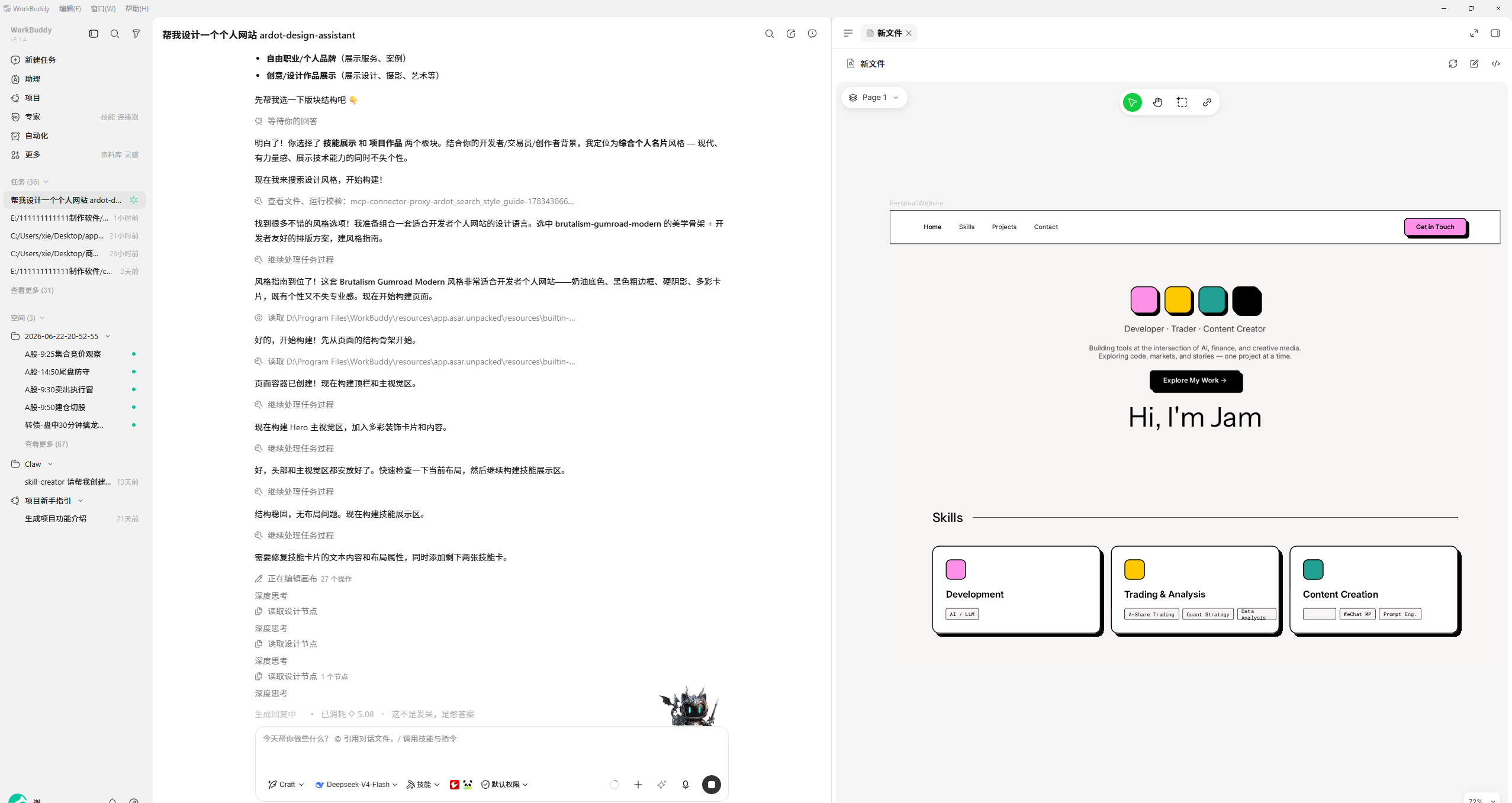
a routine, mid-run — 04:12 elapsed
A task running end to end inside the app 1 2 3
ChatGPT Plus or Claude Pro$240per year
This pack, plus the free tools$9once · tools from $0
You keep, year one$231
1任务列表 → task list 2对话区 → the agent working 3结果区 → the file it built
9tools tested
4completely free
11 minaverage, down from 47
0Chinese phone numbers needed
Oct 2026last verified
THE SWAPS

Line by line, what you stop paying for

This is the whole product in one table. The pack is the map between the two columns — which tool, which build, which settings, and where it breaks.

You're paying forSwap it forYou pay
ChatGPT Plus $20/mo → WorkBuddy international (GPT-class) + DeepSeek $0
Cursor $20/mo → Qwen Chat + DeepSeek for code $0
Runway or Sora $15+/mo → Hailuo, 10 renders a day $0
Otter / meeting AI $17/mo → DeepSeek + Kimi on the transcript $0
Stock clips $80 each → Hailuo image-to-video $0
Year one, all in Same work, different vendors $9 vs $240+

Prices checked October 2026. The $9 is this pack, paid once — every swap above runs on a free tier. One caveat worth stating plainly: the coding swap is chat-based, not a full IDE. If you need agentic file editing every day, the pack covers a $3/mo option instead. And free tiers carry limits — the pack says exactly where each one runs out, and what to do that week.

WHAT IT LOOKS LIKE

The app it actually runs in

Not a chat window. Left: your task list. Middle: the agent working, step by step. Right: the file it just built. Screens captured from the shipping build, October 2026.

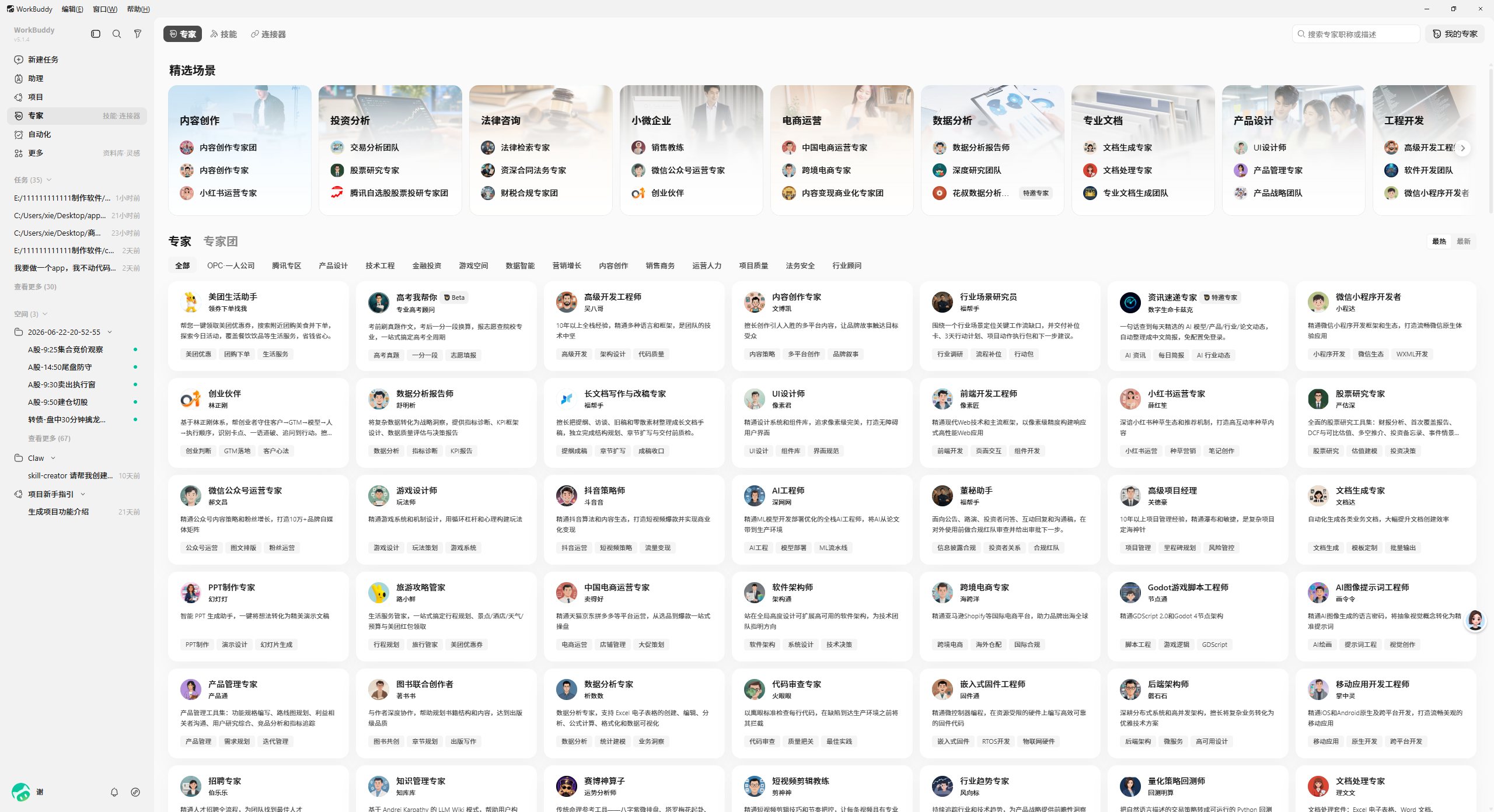
Preset expert agents inside WorkBuddy
100+ preset experts, one clickEach one is a packaged routine with its own tools. route 12 → 100+
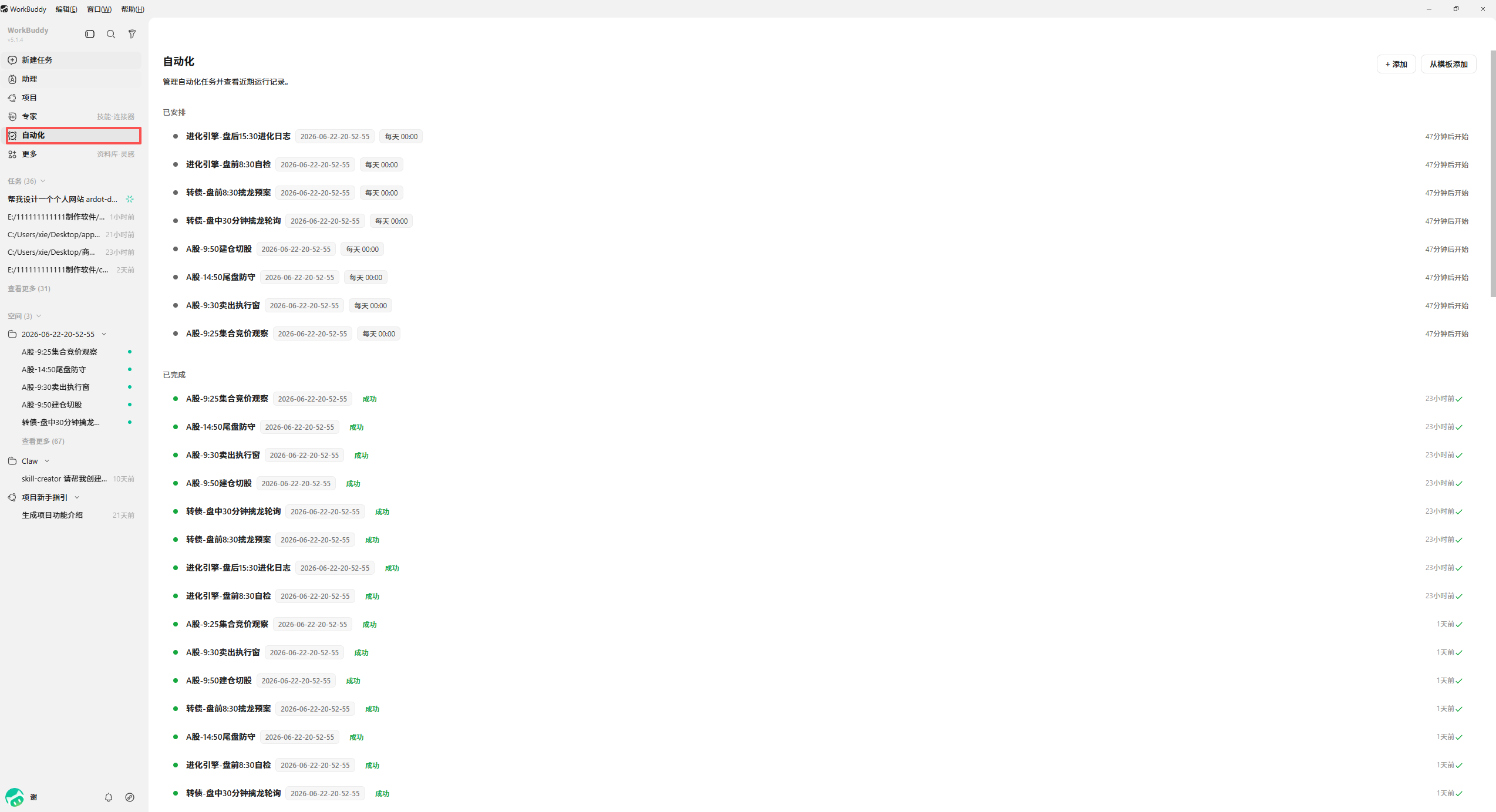
Scheduled automation runs with success and failure states
It runs on a schedule, not on your memoryEvery 9am, with a pass/fail record. daily, unattended
READ THIS

The international build is in English. The screenshots above are the Chinese build — same app, different account system, different model list. Sign in with Google or GitHub and the product is in English. Where a deeper panel is still Chinese-only, the pack has it translated, with a 150+ term map for every menu, button and error message. You are not expected to read Chinese to use this.

Screenshots show the tools' own interfaces, used here for identification. The routines, timings and translations in this pack are mine.

EIGHT OF THE TWELVE

What the week actually looks like

Eight routines spelled out below — each one a sequence, not a feature. The remaining four, and the nine tool names, are in the pack.

The downloads folder, again

20 min → 40 sec

PDFs to one place, screenshots by month, duplicates quarantined, nothing deleted without asking.

Runs on W••••••••

Friday status report

35 min → 4 min

From a rambling voice memo to a structured update your manager can skim in 30 seconds.

Runs on D•••••••

Three spreadsheets into one

50 min → 8 min

Different column names, duplicate rows, broken dates — cleaned and merged without formulas.

Runs on W•••••••• + Q••••

A sourced answer for a client

30 min → 5 min

Research with citations you can paste into a reply, not confident guesses.

Runs on K•••

A 40-page contract, in plain English

2 hrs → 10 min

Obligations, dates, and the three clauses that should worry you — flagged, not vaguely summarised.

Runs on D•••••••

Product clip for a listing

$80 + 2 days → $0, 20 min

Upload a still, describe the motion, get a usable five-second clip. No shoot, no stock licence.

Runs on H•••••

Competitor prices, every Monday

40 min → 3 min

Six pages checked, changes highlighted, only the movers surfaced.

Runs on W••••••••

Two hours of meeting, one page

50 min → 6 min

Transcript in, decisions and owners out. Action items separated from the talk.

Runs on K••• + D•••••••
THE STACK BEHIND IT

Nine tools. Four of them cost nothing at all.

All nine have international builds you can sign into with Google or GitHub — no Chinese phone number, no Chinese card. Names are in the pack.

T O O L 0 1
T O O L 0 2
T O O L 0 3
T O O L 0 4
T O O L 0 5
T O O L 0 6
T O O L 0 7
T O O L 0 8
T O O L 0 9

Three of the nine are not worth your time — one needs a Chinese phone number, two can't do what their marketing claims. They're listed too, so you don't lose an evening finding out.

WHAT'S INSIDE

The part you can't get from a blog post

Anyone can list tools. This is the setup order, the credit arithmetic, and the eleven things that break.

01

The 12 routines, step by step

Prompt, expected output, and the two places each one usually fails.

02

The access map

Which builds sign up from outside China — and the three that don't.

03

Setup, in order

Screenshots per step, macOS and Windows. Ten minutes each.

04

Credit arithmetic

Model multipliers decoded so free credits survive the month.

05

Eleven things that break

Login loops, region locks, watermarks, credit cliffs. Symptom, cause, fix.

06

When to pay anyway

An honest list of cases where the $20 subscription is still right.

07

The translation map

150+ terms, CN to EN — every menu, button and error message you'll actually hit.

INCLUDED WITH THE PACK

Three tools, not just instructions

Everything below runs on your own machine. No subscription, no account sharing.

  • Multi-account dashboard — five separate sessions, one window. Stop logging in and out all day.
  • The cleanup script — one command that files, renames and de-duplicates a folder. Dry-run by default.
  • Prompt library — 40 tested prompts for the 12 routines, in one copy-paste file.
What this is not: a promise that free stays free. Free tiers get trimmed — that's exactly why the pack ships with twelve months of update emails. You're buying the maintenance, not just the list. If a routine depends on a tool that later breaks, you get the replacement, not an apology.
PRICING

One payment. Twelve months of updates.

One routine pays for it the first time you use it.

THE FREESTACK PACK
$9$19
one-time · instant download
  • 45-page PDF, 2026 edition
  • 12 routines with prompts and failure points
  • 150+ term translation map, CN to EN
  • All 9 tools mapped, including the 3 duds
  • Multi-account dashboard + cleanup script
  • 40-prompt library
  • Update emails for 12 months
Unlock instant access
Secure checkout via Polar · VAT handled
14-day refund, no questions
FAQ

The obvious questions

Isn't the whole thing in Chinese?

The build you'll be using isn't — the international version is in English, and you sign in with Google or GitHub like any other tool. A handful of deeper panels are still Chinese-only (some expert and connector screens), and those are exactly what the pack translates, term by term, with annotated screenshots. Expect about five screens where you'll want the map. The screenshots on this page are from the Chinese build because that's the one with the settings I could document cleanly — same app, different account system.

Are these tools actually free, or free until you hit a wall?

Both, and the pack says which is which. Four are genuinely free at the level these routines need. The others give a monthly allowance — enough for the routines as written, not for running them all day. Every tool is labelled honestly, including the ones you'll outgrow.

Why hide the tool names?

Because the names aren't the value — the routines are. You can find the tools in ten minutes of searching; you can't find twelve tested sequences with the failure points marked. That said, if you only want the names, don't buy this.

Do I need a Chinese phone number or a VPN?

No +86 number for any of the nine. Some builds may ask for normal internet access on first sign-in depending on your region — that's a network question, not a workaround. The pack does not include instructions for circumventing regional restrictions.

What is the multi-account tool, exactly?

A local dashboard that keeps separate browser sessions for up to five accounts, so you're not logging in and out. It's for managing your own accounts. It is not a tool for evading platform detection, and using it against a platform's terms is on you.

Will the free tiers still exist in six months?

Unknown. That's why updates are part of the price. When a tier changes, buyers get an email with the new numbers and a replacement.

Is my data safe with these tools?

Read their policies before uploading anything sensitive. Chapter 6 covers it directly, including which categories of work should stay on a Western provider. If you handle client-confidential material, assume you need the paid option.

Refunds?

14 days, reply to the receipt, no form. I'd rather refund you than have you feel misled.